
MVVM and MVP pattern(s) as applicable to SilverLight


There could be more to these design patterns and its applicability in SilverLight, however this article is only intended to present and overview and high-level understanding of how to get started in SilverLight application patterns.

SilverLight implements SOLID design guidelines along with a MVVM or MVP design pattern.
Figure shown below  depicts the comparison of approaches followed in MVVM and MVP pattern.
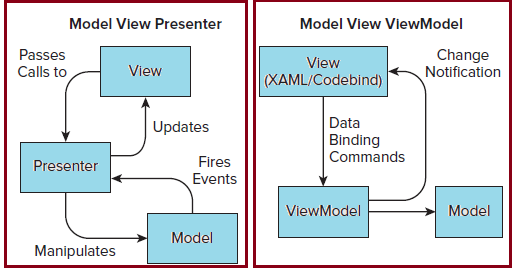


MVVM pattern can follow two approaches

1.       View First: The view is responsible for creating an instance of a ViewModel, via databinding to a static resource or setting the data context in the code-behind file.
  • Databinding approach

UserControl.Resources
local:SampleViewModel x:Key=”ViewModel” /
UserControl.Resources
                Grid DataContext=”{Binding Path=Object,
Grid is bound to object that is obviously in Model.


  • Code Behind approach
 this.DataContext = new SampleViewModel();

2.       View-Model first: The ViewModel creates an instance of the view and sets its data context.
This is usually done using an Inversion of Control Container like MEF, PRISM etc.
(This  article is only an exploration of design patterns in use in silverlight)
Both these approaches have their own pros and cons that I am not going to discuss here. For the time it’s your decision based on requirement as to which approach you want to follow.

Event Broker Pattern:
The normal way to use an event is for one class to subscribe to the events of another class. This approach works great when each class has direct access to the other and only one class can trigger an event. 

However, in more advanced scenarios one or more classes may need to send the same event or be notified by events without subscribing directly to the caller event.

Events can be treated as another type of dependency and instead of subscribing directly to an event, a container (Event Broker) could be used to manage the subscribers and publishers of an event. This is  exactly what is done in IOC /Dependency injection .
When an event occurs, the Event Broker would be responsible for notifying all subscribers that an event occurred.

Let’s consider a practical example of  handling the closing of an application.
Normal Scenario:  The application needs to loop through each control on the screen to check to see if its needs to be saved before applications closes.
Event Broker Pattern Scenario:
Event Broker handles notification to each control, to save itself. Isn’t his a better approach.

Hope this was helpful.

Till Next we connect……

Happy reading……

Comments

Popular posts from this blog

Asp.Net 4.0: An Overview-Part-III

This is the last post in the series which will explore the following new features of ASP.Net 4.0  Performance Monitoring for Individual Applications in a Single Worker Process Web.config File Refactoring Permanently Redirecting a Page Expanding the Range of Allowable URLs Performance Monitoring for Individual Applications in a Single Worker Process It is a common practice to host multiple ASP.NET applications in a single worker process, In order to increase the number of Web sites that can be hosted on a single server. This practice results in difficulties for server administrators to identify an individual application that is experiencing problems. ASP.NET 4 introduces new resource-monitoring functionality introduced by the CLR. To enable this functionality, following XML configuration snippet is added to the aspnet.config configuration file.(This file is located in the directory where the .NET Framework is installed ) <?xml version="1.0" encoding="UTF-8...

WebMatrix-The Swiss Army knife from Microsoft

  What’s more in store for Web developers, ASP.Net 4.5(with full support for HTML 5 , CSS 3 amd Javascript) and to complement it, is the new awesome tool-WebMatrix. WebMatrix combines five products in one, letting you install, develop, optimize, deploy and manage your sites and databases. With support for the latest web standards like HTML5 & CSS3, multiple frameworks like ASP.NET & PHP, and multiple database engines like MySQL & SQL Server ..and what’s even better…it FREE!! ! ( Download Webmatrix ). To learn more about webmatrix, I recomment the following video. WebMatrix-An intro The tools promises a lot and I have already downloaded a copy and started playing with it. Hope the information  here is useful. Till next we connect…. Happy Learning.

WPF Overview-Part-II

This post is in continuation to the last post. In this Post I’ll be exploring the Dependency Properties Dependency properties are similar to CLR properties with more advanced and complex features. The main difference between the CLR properties and dependency properties is, that the value of a normal .NET property is read directly from a private member in your class, whereas the value of a DependencyProperty is resolved dynamically when calling the GetValue() method that is inherited from DependencyObject . In case this description did not make sense, no need to worry, It will become clear by the time you reach end of this article. How the Value is Resolved in Dependency properties Every time a dependency property is accessed, it internally resolves the value by following the precedence from high to low. It checks if a local value is available, if not, check if a custom style trigger is active and I the similar manner continues until it finds a value. At last the default value is alwa...